Friday, 20 March 2015

Voki

Voki is a great tool that allows users to create their own speaking avatar. Introducing a speaking avatar as your teaching assistant can make your English class fun and exciting!

Here is the website of Voki:

  • you can create your own speaking avatar.  
  • you can create a Voki classroom where students can view and do their Voki assignment, and teachers can review students' assignments.
  • you can create presentation and add speaking avatar to each slide


Here are some ways Voki can be used for students to promote better learning outcome:
  • students can use Voki to record themselves reading a passage or saying dialogue, and listen to their recordings to check their pronunciation and fluency.
  • students can use Voki to give presentation to the whole class in English, especially for those who feel uncomfortable speaking publicly, so other students can give comments to the presentation without the fear of embarrassing the speaker.
Voki offers a lot of useful and creative lesson plans. Here is a lesson plan I found from the website:


Quizlet

Quizlet is an online tool to aid users in memorization.
below is the link of Quizlet:


You can create study sets according to your needs. Once you create a set of terms, you can choose your study mode. Quizlet offers users five study modes.
Here I would like to show you how each mode can be used in your English class to promote better learning outcome.


  • Flashcards
By using Flashcards, teachers can show students pictures and ask students to speak out the correspondent vocabularies. 


  • Learn
Teachers can use this mode to check students' comprehension of abstract concepts, they can show the definition of the concept and ask students to fill the blank.Here is a set of terms I create in order to check my students' understandings about some jargon in psychology.


  • speller
Teachers can use this mode to check students' spelling of the vocabulary they have learned.


  • scatter
This mode allows teachers to check students understanding of certain word or concept.Teachers can ask students to match the definition with the corresponding vocabulary or match the explanation with the abstract concept.


  • space race
 This mode is like a game which not only can be used to check students' understanding but also can be used to train their response speed, processing speed and working memory. Teachers can create a set of terms introduced in the class and ask students to practice after class on their own.


As an English teacher, I would like to use Quizlet in my class for the following reasons:

  • teachers can create their own sets of terms according to their pedagogical goal.
  • teachers can present content in varied form, which caters for auditory, visual or kinesthetic learners. 
  • teachers can create sets of terms and ask students to practice on their own, which allows students to learn at their own pace.
  • teachers can present language knowledge with image and sound, which can consolidate students' memory of the knowledge.


vialogues

Vialogue is an online tool allows users to upload video and invite people to comment on the video.it is basically a video discussion platform.

Here is the link of Vialogue:


you can ask your students to go to the website. if you have a class blog, you can embed Vialogues on your blog.
Here I create a sample Vialogue that gets my students to give their opinion about gender equality:


  • Vialogue allows teachers to use authentic material in language teaching, asking students to watch and discuss an interesting English movie or advertising video can increase students' interest in English, 
  • Vialogue encourages interaction between students.students can leave comments after watching the video and they can see each other's comments at the same time.students are encouraged to think critically about one topic and comment on each other's opinion, as the best way to master a language is by communicating with people in that language.
  • Vialogue allows teachers to give instructions in a systematic way, teachers can scaffold the discussion by adding comments, surveys and open-ended questions. 


Thursday, 19 March 2015

Screen-o-mastic

Basically, Screencast-o-matic is a screen casting tool.
As an English teacher in China, my students are secondary school students, I would like to use screen-o-matic to create my own video lesson, and ask my students to watch before and after the class, so the class time can be used for more active learning activities, like discussing about the video they watched or practicing what they learned from the video.

Below is the link of the website:

You can either click the “start recording” button to record or you can download it on your computer.
Here is a vedio teach you how to use Screencast-o-matic to create a Powerpoint presentation for flipped classroom:


Personally, I appreciate using the video lesson in English teaching for two main reasons.

  • Students can watch the video lesson before and after the class. When students watch the video alone, they can think about the concepts or memorize the vocabulary on their own and studying at their own pace. The video lesson enables students to go over the lesson over and over, they can stop it where confused them. In addition, the video lesson provides both vivid image and sound at the same time. By associating the picture with the sound, students can better remember the vocabulary and understand the concept.
  • Students can make the most of the limited class time for active learning activities.The length of a typical English class in secondary high school in China is only 45 minutes, by moving the information-transmission teaching out of class, teachers can set aside more class time for student to engage in active learning activities. In active learning activities, students are required to analyze, synthesize or evaluate the knowledge they learned from the video, which result in deeper understanding and better learning outcome.
However, although screencast-o-matics is easy to use for screen recording, making a high-quality video lesson is still a time-consuming task for many teachers. Despite the time used for searching and choosing suitable materials for the video,teachers need to spend a lot of time on editing, which will definitely increase their workload.


Tuesday, 10 February 2015

Tricider

Tricider is a website for collecting ideas and encouraging group discussion.
Here is the link of Tricider, you can click and explore the website by yourself:

http://www.tricider.com/


As a English teacher, I would like to use Tricider to collect feedback from my students after the class, so I can refine my lesson according to the feedback I received and figure out the strength and weakness of each lesson.

Here I wanna share with you my idea on using Tricider to improve English class which lead to better learning outcome.

1.
  • You can go to the website and enter your question in the blank.
  • Click 'Go' and this button will bring you to the next webpage.


2.

Below is a question I put forward in order to gain some feedback about the class from my students.
  • As you can see from the picture below, the sentence in bold print and red color is the question I want to get response from my students. 
  • You can click the green button to add your own idea about the question.
  • or you can show your agreement or disagreement to other students' ideas by adding your own argument.


Personally, I would use Tricider for discussion before or after class,rather than in class, some people may argue that using Tricider for classroom discussion can encourage students who are shy or unwilling to express their opinion publicly to participate in the discussion. However, the length of a typical English class in high school is only 45 minuites, so using Tricider for classroom discussion seems not very efficient as oppose to asking students to discuss with each other face to face in the class.


Sunday, 8 February 2015

Duolingo


Duolingo is designed for language learning, it is fun and it is free! you can either download the app on your mobile device or you can go to the website directly! I would like to download it on my phone so I can learn and practice English anytime and anywhere.

Here is the link of Dolingo and you can explore the website by yourself:

https://www.duolingo.com/

I would like to briefly introduce how to use Duolingo to learn and practice your English.


1. Download the app on your phone and sign up for it.


2. You can start from the beginning or you can choose the level you want to start with.


3. Dolingo provides you with multiple choice exercise to consolidate and develop your knowledge of vocabulary and grammar, also it provides you with translation exercise. in each short lesson, you can gain instant feedback after answering each question.


4.You can track your progress after completing each task.
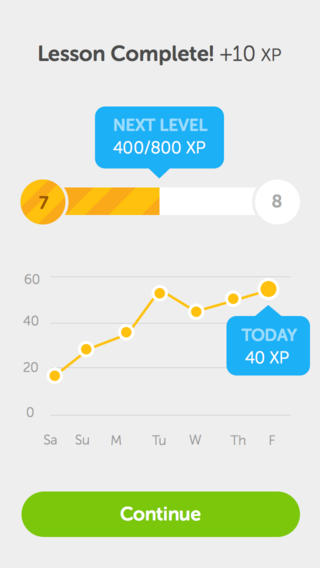


As a teacher,I would recommend my students to download Duolingo on their phone, so they can make the most of their spare time to learn and practice their English.There are two main reasons why I think Duolingo can engage students in English learning and makes learning more interesting and effective.

  • Each time students complete a task, you got score.the system provides instant feedback after each task, it makes students feel like they are making progress. this kind of positive reinforcement can motivate students to continue the following task.
  • Each time students go through a task, the system will help them to identify their weakness so that they can focus on practicing their weak skills, resulting in better learning outcome!


As you know, nothing is perfect, Dolingo is helpful and effective if you want to enlarge your vocabulary or improve your grammar, but it is less helpful if you want to improve your spoken English or improve your writing skills, as it doesn't provide you opportunity to communicate in English.


Saturday, 7 February 2015

Glogster

Glogster is a website where allows users to create their own educational content, or you can find some interesting and inspiring teaching materials from the Glogpedia content library.

Below is the link of the website, you can click and explore the website by yourself :)
http://edu.glogster.com/
And here I wanna briefly introduce what you can do with Glogster.


1.Students can choose a topic which they are interested in and create a electronic poster individually or in a group.As you can see from the picture below, students can put together text,sound, video, images, graphics and etc in one poster, and they can present their posters to each other and share their ideas in the class.


2.The most intriguing part of Glosgster for me is that there are a variety of hand-picked glogs available online, and many of these glogs are high quality and well-organized! Compare to creating your own teaching materials from scratch, this website is super convenient and time-saving for you to select useful teaching materials :) 

and this website is not only for English teachers! if you want to teach other subjects in English, this website is absolutely suitable for you!


Although I am not sure whether it can improve the outcome of language teaching and learning. I still wanna recommend this website to you!

As a students, I would like to use it, because it increases learner-autonomy and creativity. I'd rather work with my peer to create our own content instead of following the instructions by teachers strictly.
If you are a teacher, using this website can help you save your time in preparing the lesson. Apart from time-saving, teaching English by using vivid images and video is more attractive than by writing down all the grammar points in the blackboard.In addition to this, a large amount of authentic materials is another benefit for teachers to introduce Glog to their language class.

By the way, if you want to use it you need to pay for it, the cheapest pricing is 39 dollars per year, it would be a good idea for many teachers in one institution to share one account,although it is a bad idea for the company!
I feel like I am writing an advertising for Glogster, so whether to use it or no depends on your budget and your preference.I should remind you of being a critical audience when you are reading my poster!